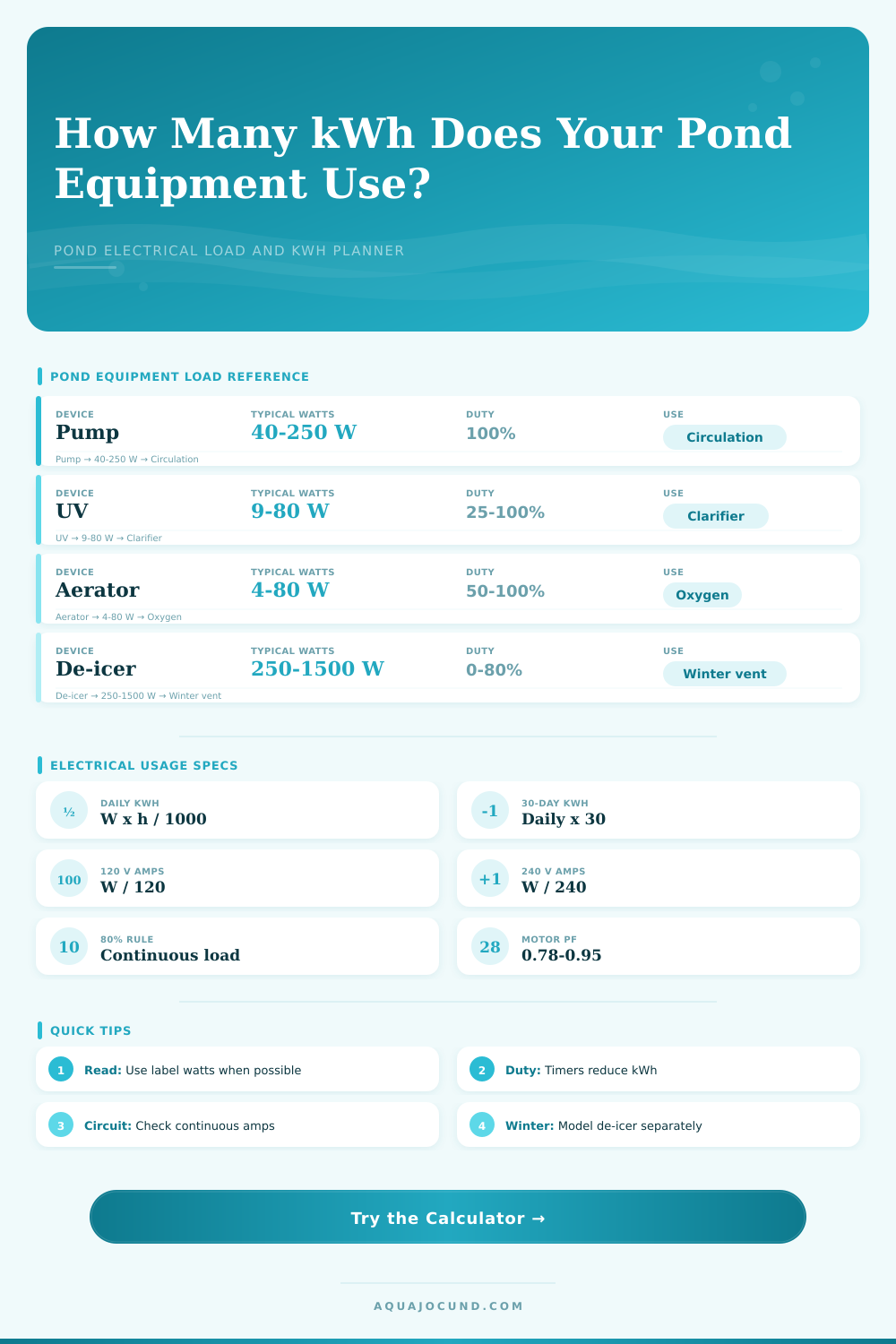
Pond Electrical Load and kWh Usage Calculator
Estimate pond pump, UV, aerator, and de-icer electrical load, duty-cycle kWh, circuit amps, and continuous-load headroom.
Pond electrical load results
| Equipment | Common watts | Typical duty | Daily kWh example | Electrical note |
|---|---|---|---|---|
| Small fountain pump | 15 to 45 W | 50 to 100% | 0.18 to 1.08 kWh | Often runs from a timer or daylight schedule |
| Main pond pump | 60 to 250 W | 100% | 1.44 to 6.00 kWh | Usually treated as continuous circulation load |
| Waterfall pump | 150 to 600 W | 25 to 100% | 0.90 to 14.40 kWh | High-flow pumps dominate daily kWh |
| UV clarifier | 9 to 80 W | 25 to 100% | 0.05 to 1.92 kWh | Seasonal timers change the total strongly |
| Air pump | 4 to 80 W | 50 to 100% | 0.05 to 1.92 kWh | Often left continuous in warm weather or winter |
| De-icer | 250 to 1500 W | 0 to 80% | 0.00 to 28.80 kWh | Thermostats cycle with air temperature and wind |
| Pond setup | Volume | Typical devices | Connected watts | Daily kWh range |
|---|---|---|---|---|
| Patio fountain pond | 80 gal / 303 L | Small pump, light accessory | 25 to 70 W | 0.30 to 1.68 |
| Goldfish garden pond | 500 gal / 1,893 L | Main pump, UV, small air pump | 90 to 220 W | 2.0 to 4.9 |
| Backyard koi pond | 1,500 gal / 5,678 L | Pump, UV, air pump, controls | 180 to 420 W | 4.0 to 9.5 |
| Waterfall pond | 2,500 gal / 9,464 L | Main pump plus waterfall pump | 350 to 800 W | 5.0 to 19.2 |
| Winter koi layout | 2,000 gal / 7,571 L | Air pump and thermostatic de-icer | 330 to 1580 W | 1.5 to 22.0 |
| Voltage | 500 W load | 1000 W load | 1500 W load | Continuous check |
|---|---|---|---|---|
| 120 V | 4.17 A | 8.33 A | 12.50 A | 15 A circuit at 80% is 12.0 A |
| 208 V | 2.40 A | 4.81 A | 7.21 A | 20 A circuit at 80% is 16.0 A |
| 230 V | 2.17 A | 4.35 A | 6.52 A | Nameplate voltage should match equipment |
| 240 V | 2.08 A | 4.17 A | 6.25 A | Use only equipment listed for this voltage |
| Formula | Expression | Example | Result |
|---|---|---|---|
| Daily kWh | Watts x duty x 24 / 1000 | 120 W x 100% x 24 / 1000 | 2.88 kWh/day |
| Period kWh | Daily kWh x days | 2.88 x 30 | 86.4 kWh |
| Running amps | Watts / volts | 500 W / 120 V | 4.17 A |
| Estimated motor VA | Watts / power factor | 120 W / 0.78 | 154 VA |
| Per 1000 gal intensity | Connected watts / pond kgal | 200 W / 1.2 kgal | 167 W/kgal |
After most people get their electric in place, they find out how much it costs. Now they has added a pump to aerate the water. Add a UV clarifier for algae control and maybe throw in an aerator for the fish.
Now the system is set up and the bill comes. Running the pumps 24/7 are going to make that bill pretty high. The cost of equipment isn’t as big an issue as the fact that the load runs all the time. Turn the power on without understanding the load and you can end up breaking motor and tripping your breaker. But more importantly, you waste money.
How to Save Money on Your Pond Bill
If you have the wattage of your components and know their typical duty cycle (how long they are on daily), the calculator does the rest (above). Begin with devices that is in the water… A complicated koi pond require more than just a simple fountain, for instance. It will ask about water volume (as this gives some context) but the devices pull energy. So maybe a submersible pump draw one hundred twenty watts continuously? That’s almost three kilowatt-hours per day. Over a month, that adds up.
The interface breaks down those load so you can enter them separately: the main pump, de-icer, UV unit, etc. Why bother breaking them out? This is because the devices aren’t necessarily all running at the same time. Estimates break down here because off duty cycle. Most think “It’s running all day.” Not so.
If the pond sits outside, a UV clarifier doesn’t have to run 24/7. Maybe only half the time? Set it accordingly and save half the energy. An aerator typically runs year-round to add oxygen, but you can turn off the water pumps at night if noise is an issue. The calculator includes those percentages in the overall calculation. So it turns a rough guess into a precise projection.
In this case, turning off the waterfall from midnight until morning save money after thirty days. A little bit, sure…but it adds up when you fine tune a system that’s running for months.
The tool also displays circuit safety. A lot of home ponds is wired using standard fifteen amp breakers on a one hundred twenty volt circuit. Under electrical code, there must be an eighty percent safety margin when it comes to continuous loads. That means don’t pull more than twelve amps from your circuit. Drawing more than that increases the chance of overheated wires and tripping the breaker. The calculator will check your total watts to determine whether they falls within your breaker rating.
This is extremely important for winter setups since a de-icer pulls two hundred to five hundred watts. Combine this with a high-flow pump on the same circuit and in cold weather the fuse blow. Plan according to the eighty percent rule to keep everything running safely.
There is a tradeoff between clarity and cost. If you want crystal clear water, leave the UV lamp on 24/7. That’s expensive. Turn it off at night or during the day to save power, and that lets algae proliferate. Decide what you want. Do you want to run your equipment constantly for convenience, or use a timer to mimic daylight cycles? The calculator doesn’t make this decision for you. What it does do is present the cost in both kilowatt-hours and dollars so you can see the pros and cons of various options.
For example, run a variable speed pump vs. You could also use a less expensive fixed speed pump. Will the initial savings gets eaten up with additional electrical bills over the next couple of years? The numbers will tell. In many cases, that inexpensive pump ends up costing you more money.
In winter, de-icers are controlled by temperature. So they don’t kick on until temperatures fall, and then their duty cycle varys by the weather. You can input that variation into the tool so it estimates your use under both mild and harsh winters. In other words, it helps you plan for those seasonal spikes in usage. Also, it’s a reminder to check your drip loops and GFCI outlets prior to snowfall. High electrical loads and wet connections = safety risk.
The bottom line is this, tracking the load gives you control over your pond’s electrical system. Monitor the load to manage your fuel expense. Plan your energy usage instead of guessing. Know what devices is running, their cost and what the circuit can bear.
This results in a predictable electric bill and a healthy pond. The fish stay active. The water is clear. You would of had no more surprise charges.