Phosphate Dosing Calculator KH2PO4
Calculate dry KH2PO4 grams or stock solution milliliters to raise aquarium PO4, with purity correction, potassium contribution, and safety caps.
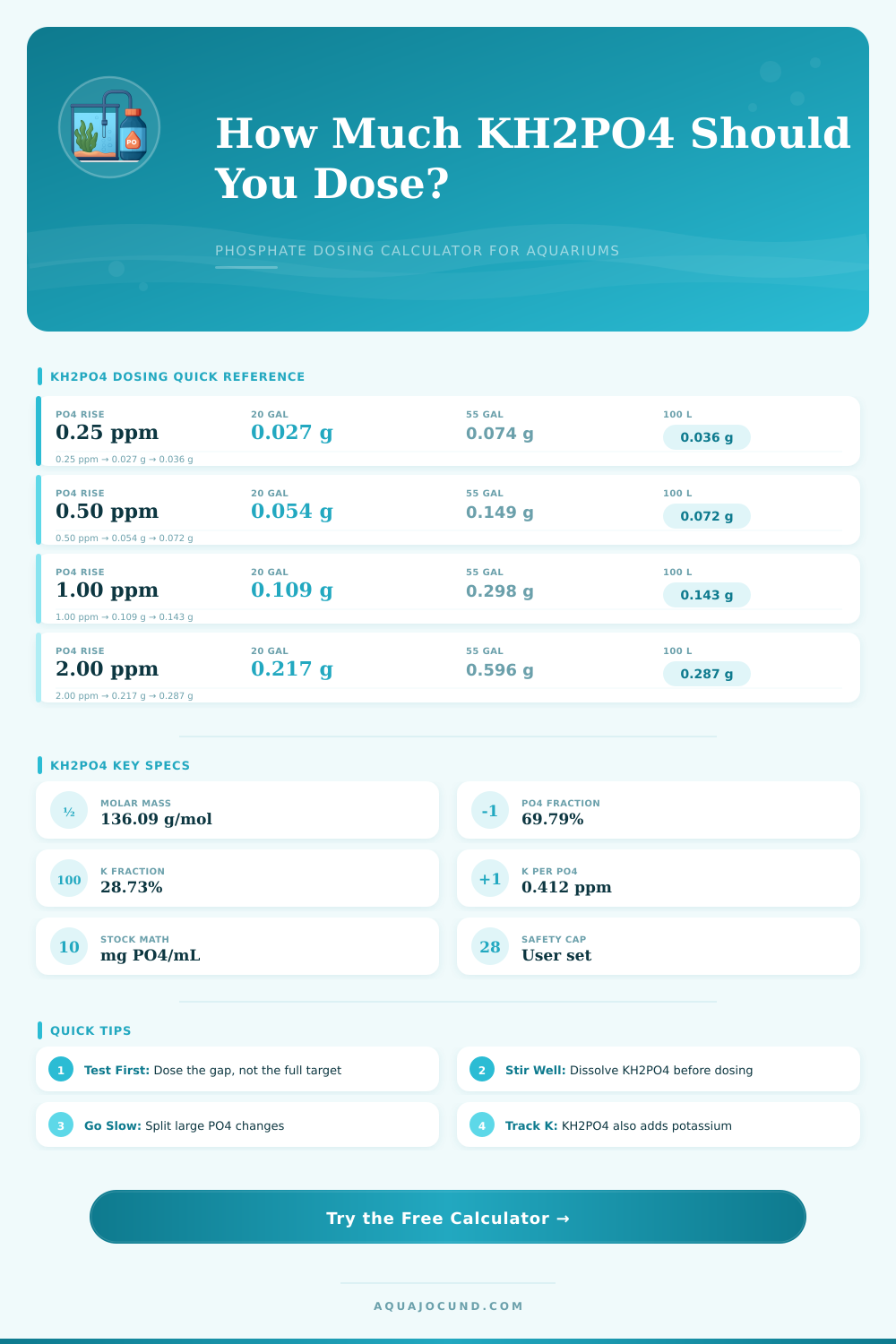
| Compound | Formula basis | Mass fraction | Calculator use |
|---|---|---|---|
| Monopotassium phosphate | KH2PO4 | 100% compound | Dry salt weighed or dissolved |
| Orthophosphate as PO4 | 94.971 g/mol | 69.79% of KH2PO4 | Target aquarium phosphate ppm |
| Potassium as K | 39.098 g/mol | 28.73% of KH2PO4 | Secondary nutrient contribution |
| Hydrogen | 2.016 g/mol | 1.48% of KH2PO4 | Included in molar mass only |
| Tank size | Metric volume | 0.5 ppm PO4 | 1.0 ppm PO4 | 2.0 ppm PO4 |
|---|---|---|---|---|
| 10 gal | 37.9 L | 0.027 g KH2PO4 | 0.054 g KH2PO4 | 0.109 g KH2PO4 |
| 20 gal | 75.7 L | 0.054 g KH2PO4 | 0.109 g KH2PO4 | 0.217 g KH2PO4 |
| 55 gal | 208.2 L | 0.149 g KH2PO4 | 0.298 g KH2PO4 | 0.596 g KH2PO4 |
| 75 gal | 283.9 L | 0.203 g KH2PO4 | 0.407 g KH2PO4 | 0.813 g KH2PO4 |
| 100 L | 26.4 gal | 0.072 g KH2PO4 | 0.143 g KH2PO4 | 0.287 g KH2PO4 |
| 200 L | 52.8 gal | 0.143 g KH2PO4 | 0.287 g KH2PO4 | 0.573 g KH2PO4 |
| KH2PO4 in bottle | Final bottle volume | PO4 per mL | Best use |
|---|---|---|---|
| 10 g | 500 mL | 13.96 mg PO4/mL | Nano and low-tech tanks |
| 30 g | 500 mL | 41.87 mg PO4/mL | Most planted aquariums |
| 60 g | 500 mL | 83.74 mg PO4/mL | Large tanks with measured dosing |
| 30 g | 1000 mL | 20.94 mg PO4/mL | Gentler per-mL dosing |
Phosphate dosing have an impact upon the long-term behavior of your planted tank. If the growth of your plant appears to be stalling, but your nitrate and potassium levels is stable, you may need to add more phosphate to your tank. This calculator is a tool that will help you to determine how much KH2PO4 to add to the planted tank to achieve your desired change in phosphate levels.
Using KH2PO4 can be difficult if you are require to make an assumption as to how much KH2PO4 should be added to the planted tank. If you add too little KH2PO4, the plants will not receive enough phosphate to support there growth. If you add too much KH2PO4, however, you may end up creating conditions in which algae will begin to grow in your planted tank, which can lead to an unexpected increase in the potassium levels in the water.
How to Add KH2PO4 to Your Planted Tank
KH2PO4 is a salt that provides two nutrient to the planted tank. The phosphate contained within KH2PO4 provides food to the plants, and the potassium contained within the same salt are added to the planted tank at a fixed ratio to the phosphate. Therefore, although you may monitor the phosphate levels in your planted tank, you may not be aware that the addition of KH2PO4 also adds potassium to the tank at the same time.
As a result, the potassium levels in your tank may reach levels that are higher then the requirements of the plants. This calculator accounts for both the phosphate and the potassium in KH2PO4 so that you can determine whether the additional potassium is helpful for your planted tank, or whether it could potentially become a problems. The volume of your planted tank is one of the factor that is required to use the calculator.
Most individuals will have to estimate the volume of the tank, however. The volume listed for your planted tank is often inaccurate due to the fact that it does not take into account the volume of the substrate, rock, and other items in the tank. The field for entering the displacement for the tank will allow for the correction of the tank volume to account for these items in the tank.
A change in the volume of the planted tank will have a significant impact upon the amount of KH2PO4 that need to be added to the tank. If the actual volume of the planted tank is less than that which you estimated, then adding a given gram of KH2PO4 will significantly increase the levels of both phosphate and potassium in the water. Thus, both the displayed volume of the planted tank and the percentage correction for that volume are required field within this calculator.
The current and target level of phosphate in the tank will determine how much KH2PO4 should be added to the planted tank. You can choose to add all of the KH2PO4 at once, but this could contribute to the growth of algae in your planted tank. Alternatively, you can split the dose of KH2PO4 that is calculated over a period of several day so that the risk of algae growth is significantly reduced.
The frequency selector will allow you to view how much KH2PO4 will be added to the planted tank during each of the periods that you select. The purity of the KH2PO4 that is to be added to the planted tank may have an impact upon the amount of phosphate and potassium that is added to the tank. For example, if the purity of the KH2PO4 is less than 100%, then you will need to add more of the KH2PO4 to ensure that the target levels of both phosphate and potassium is achieved.
If you do not account for the purity of the KH2PO4, you will end up dosing your planted tank with more KH2PO4 than you intend to add, and your tank will be over-dosed with phosphate and potassium each time that you perform a dosage. Thus, the purity field within the calculator allow for the adjustment of the amount of KH2PO4 to account for the purity percentage of the KH2PO4 that you plan to use. There are safety cap that can be used within the calculator to avoid dosing too much KH2PO4 into the planted tank at one time.
Because the calculator does not have the ability to view the planted tank itself, you must enter the limits for the amount of KH2PO4 that you wish to add at once to the tank, as well as the amount of milliliters of KH2PO4 that you plan to add each day. A large planted tank with many fish in it will have a different limit than a small planted tank with few fish living in the water. Any plans that would add more KH2PO4 to the planted tank than the limits that you enter will be flagged within the calculator.
You may either choose to accept these flag, or you may choose to adjust your dosing plan. You can choose to dose the KH2PO4 in the dry form, or you can choose to use a stock solution of KH2PO4 instead. If you choose to dose the KH2PO4 in the dry form, you will need a scale that is accurate enough to measure the KH2PO4 to the nearest 0.05 gram.
Most kitchen scale are not accurate to the 0.05 gram level. If you choose to use a stock solution of KH2PO4, the small weight of KH2PO4 will be dissolved in enough water to create a larger volume of liquid that can be poured into the planted tank. The fields for the concentration of the KH2PO4 solution will allow you to design your stock solution.
An additional side-effect of adding KH2PO4 to your planted tank is that the salt maintains the ratio of phosphate to potassium. Thus, when you add phosphate to your tank, you are also adding potassium to the tank. This side-effect may be problematic if your tank receive additional potassium from other fertilizers.
The calculator will show the rise in both the phosphate and potassium levels simultaneously so that you can decide whether you should use a different source of phosphate to your planted tank. Many of the mistake with KH2PO4 relate to specific dosing habits. For instance, some individuals will add all of the KH2PO4 to the tank required to reach the target levels of phosphate in the water.
Others will use the total volume of the planted tank rather than the water volume in the tank. Additionally, some individuals will not consider the side-effect of the addition of potassium to the tank until their potassium levels becomes too high for the planted tank. These mistakes can all be avoided if you treat each field in the calculator as a real measurement.
The reference table located on this page are helpful only for quick check of the settings for the tank, rather than for the actual dosing of KH2PO4. The tables allow you to quickly view the changes to the KH2PO4 dose based on the volume of the planted tank, and the changes to the concentration of the KH2PO4 solution based on the gram-to-milliliter ratio. You can also use the calculator to run the same calculations to determine how splitting the dose into multiple periods will impact the actual amounts of KH2PO4 that will be added to the planted tank each day.
The tables make visible the mathematical changes that will occur in the planted tank to the levels of both phosphate and potassium. Adding KH2PO4 to your planted tank is most successful with small, steady addition of the compound to the water. Otherwise, you are responsible for testing your planted tank and dosing the KH2PO4 according to the calculation provided by the calculator.
If the test of your planted tank shows that you have achieved the target levels of phosphate without inducing an algae bloom or a spike in the levels of potassium in the tank, then you have set each of the fields to what you believe to be the correct setting for your planted tank.