Aquarium UPS Backup Runtime Calculator
Estimate how long a UPS can keep aquarium circulation and aeration running during an outage.
⚡Backup presets
🔋UPS and load inputs
Backup runtime estimate
📊Critical load grid
🔌Backup method comparison
📘Typical aquarium emergency loads
| Load type | Typical watts | Duty cycle | Backup priority |
|---|---|---|---|
| USB or small air pump | 1 to 4 W | 100% | Very high for oxygen |
| Diaphragm air pump | 4 to 12 W | 100% | High for stocked tanks |
| Small internal filter | 5 to 12 W | 100% | High if bio media stays wet |
| Canister filter | 15 to 35 W | 100% | High if safe from siphon issues |
| DC return pump | 18 to 60 W | 40 to 100% | High for reef sump oxygen |
| Heater | 50 to 500 W | 5 to 60% | Conditional by room temperature |
📝UPS sizing reference
| UPS class | Approx battery energy | Best aquarium load | Runtime note |
|---|---|---|---|
| 450 to 650 VA desktop UPS | 80 to 160 Wh | Air pump or small filter | Best with 5 to 15 W load |
| 850 to 1000 VA UPS | 180 to 350 Wh | Filter plus air pump | Can bridge many short outages |
| 1200 to 1500 VA UPS | 300 to 650 Wh | Return pump at reduced speed | Check real watt rating |
| Portable power station | 500 to 2000 Wh | Longer aquarium outages | Often better for heater use |
📏Common tank backup targets
| Aquarium scenario | Keep running first | Suggested target | Planning note |
|---|---|---|---|
| Betta or nano tank | Air or small filter | 8 to 24 hours | Heat loss may be the limit |
| Planted community tank | Surface agitation | 8 to 16 hours | Lights are usually skipped |
| Goldfish tank | Air pump | 12 to 24 hours | High oxygen demand |
| Mixed reef with sump | Return or powerhead | 6 to 12 hours | Use reduced pump speed |
| Heavily stocked tank | Air plus circulation | 12 to 24 hours | Plan extra reserve |
⚙Duty cycle and reserve guide
| Setting | Use when | Typical value | Calculator effect |
|---|---|---|---|
| Pump duty cycle | Controller pulses or reduced-speed mode | 50 to 100% | Lowers average watts |
| Heater off | Room stays warm enough for the outage | 0% | Greatly extends runtime |
| Heater thermostat | Cold room or sensitive livestock | 10 to 40% | Adds average heater watts |
| Battery reserve | Lead-acid age, lithium reserve, uncertainty | 15 to 30% | Reduces usable Wh |
| VA headroom | Motors or startup surge | 25% plus | Checks overload risk |
💡Runtime tips
So it’s another Tuesday night. It’s cold out so you’re nice and snug with a few good layer of blanket over yourself when it happens…the power goes out. Before you can even realize what happend, you’re lying there clueless while the peace and quiet outside turns into a slow death within your aquarium. Every aquarist fear this scenario.
The fish don’t care if you have somewhere to be. They need water movement, steady temperatures, and oxygen right now. Don’t wait until the lights go out before thinking about a backup power solution because at that point you’re taking a chance with expensive livestock. Your objective isn’t just keeping the tank operational…but rather maintaining a stable environment long enough for you to get home or until the utility companies fixes the problem.
How to Protect Your Fish During Power Outages
When folks purchase a UPS, most do so based off the ampere rating and volts. They don’t understand that apparent power uses up the real power that depletes the battery. Actual useful energy is vastly different than apparent power. The calculator does all the math for you. It converts all those confusing terms into hours of true runtime.
This requires you to consider your own load, not take a guess. Before you can make any prediction about how much time a battery will last, you must know exactly what it is powering. First step…what’s important? Small filtration like a circulation filter or air pump are typically critical as these devices keep the surface area full of oxygen.
Heaters are another matter. They use tons of wattage but also turn off/on as the room heat up. If the room is cold, a heater left on during an outage can kill a UPS within minutes. Shutoff may be the only way to prevent suffocation of your fish while allowing them to bear a little colder water.
To address the real world, the tool requests information such as battery reserve and inverter efficiency. When you convert direct current to alternating current, batteries becomes less efficient. Inverters are imperfect. They typically burn off 10-15% of their stored energy as heat. Failing to take this into consideration means your estimated runtime will be overly optimistic.
Likewise, when you discharge a lead-acid battery to zero, you kill its lifespan. To maintain a healthy battery for the upcoming storm, you need to have some reserve capacity remaining. The calculator accounts for this by reducing the amount of usable energy accordingley. This takes the marketing hype out of the equation and reveals the actual amount of energy you have on hand in your unique setup.
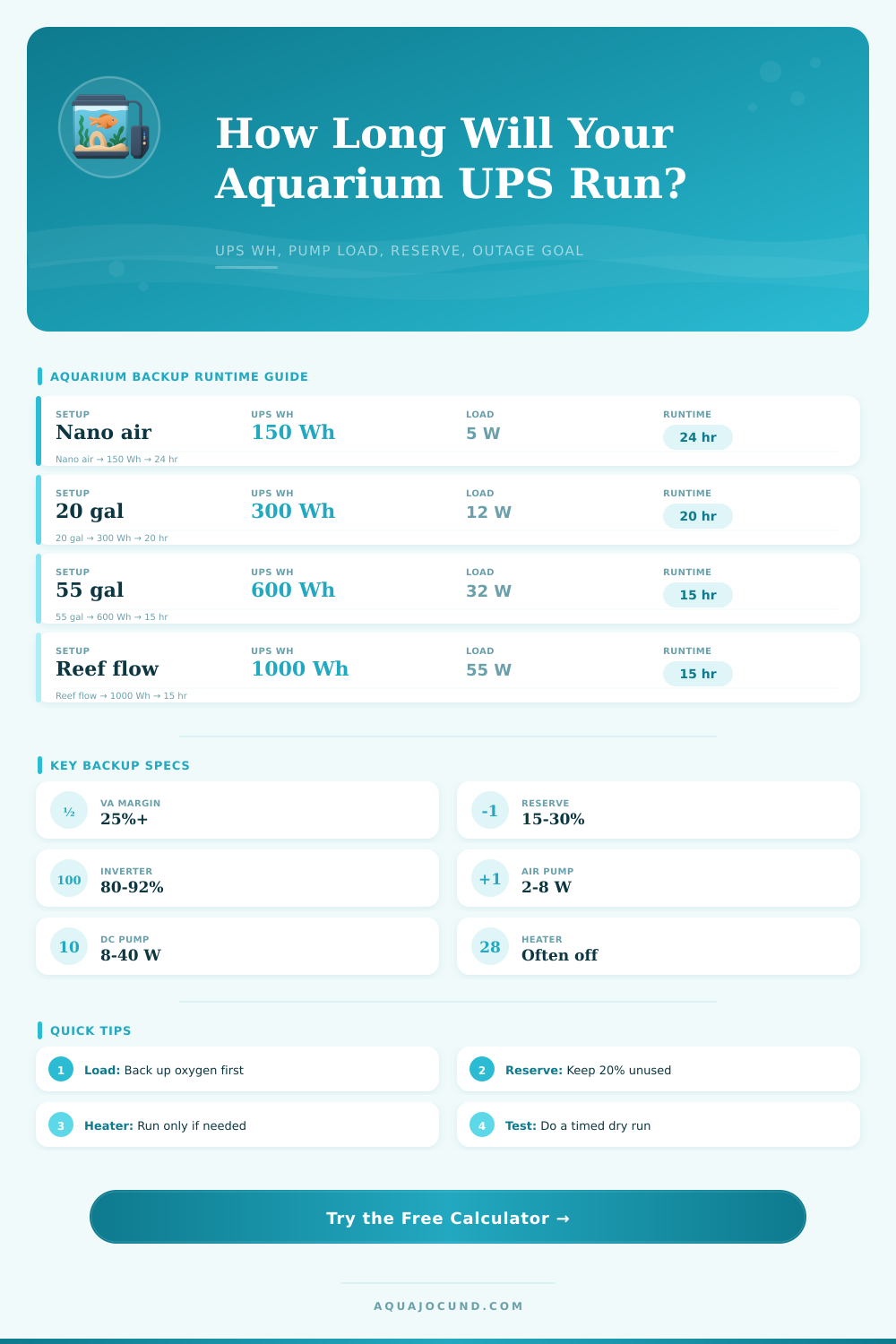
Most people fail here. They purchase a 10-minute full load UPS. What they don’t consider is how long it’ll last if sized properly (i.e., eight hours at low load). Think about your gear’s duty cycle. Half the usage rate (i.e., 50% speed) doubles backup time compared to running it at full blast. For example, a DC return pump that runs at 50% speed consume only half as much electricity compared to when it is running at full blast.
That’s one easy tweak that increases your backup time, but doesn’t involve upgrading any hardware. In other words, it’s a matter of adjusting the duration versus the intensity of the water flow. For instance, if you’re running a reef tank, you may want to decrease water flow a bit for emergencies. This prevents the risk of having no flow at all if your battery runs out too fast.
The page lists some reference tables that will help you visualize this tradeoff depending on tank size and set up. For example, a large planted aquarium might demand more electricity just to keep filters going whereas a nano tank require much less juice to sustain life. Knowing what kind of set up you’re dealing with helps you avoid either under- or over-buying.
So test your system before you need it. Batteries do not age well. They tend to lose much of their capacity in as little as 2 years after being purchased. What was a great unit last summer would of been dead by next winter. Run a timed outage simulation with the calculator first to set expectations, then physically test the UPS with your actual gear connected.
If possible measure the actual wattage. Label ratings is sometimes off. That’s why this verification step is cheap insurance from a surprise fish kill. The peace of mind is well worth an hour of testing and a plug-in meter.
Your aquarium is a living ecosystem completely dependent upon electricity for all of its life support systems. Who lives and dies hinges upon your level of preparation when the grid goes down. Be prepared for the worst, and sleep like a baby when the lights go out.