Root Tab Count by Substrate Area Calculator
Estimate aquarium root tabs from tank footprint, planted coverage, root feeder density, tab spacing grid, tab strength, interval, and heavy root zones.
Root Tab Plan
| Planting Level | Typical Plants | Density Target | Best Use |
|---|---|---|---|
| Light root feeders | Small crypt groups, scattered rosettes | 0.6 tabs per sq ft | Low-tech tanks with open foreground |
| Mixed root feeders | Crypts, vals, dwarf lilies, stems | 1.0 tab per sq ft | Community planted aquariums |
| Dense root feeders | Crypt carpets, dwarf sag, chain swords | 1.4 tabs per sq ft | Broad planted beds with steady demand |
| Heavy root bed | Amazon swords, lotus, large crypts | 1.8 tabs per sq ft | Deep roots and nutrient-hungry crowns |
| Very heavy jungle | Large swords, aponogeton, dense rosettes | 2.2 tabs per sq ft | High biomass layouts with root priority |
| Tank | Footprint | Area | Typical Tab Range |
|---|---|---|---|
| 10 gallon | 20 x 10 in / 51 x 25 cm | 1.4 sq ft / 0.13 sq m | 1 to 4 tabs |
| 20 long | 30 x 12 in / 76 x 30 cm | 2.5 sq ft / 0.23 sq m | 2 to 7 tabs |
| 29 gallon | 30 x 12 in / 76 x 30 cm | 2.5 sq ft / 0.23 sq m | 3 to 8 tabs |
| 40 breeder | 36 x 18 in / 91 x 46 cm | 4.5 sq ft / 0.42 sq m | 5 to 14 tabs |
| 55 gallon | 48 x 13 in / 122 x 33 cm | 4.3 sq ft / 0.40 sq m | 5 to 13 tabs |
| 75 gallon | 48 x 18 in / 122 x 46 cm | 6.0 sq ft / 0.56 sq m | 7 to 19 tabs |
| 125 gallon | 72 x 18 in / 183 x 46 cm | 9.0 sq ft / 0.84 sq m | 10 to 30 tabs |
| Decision | Lower Count | Standard Count | Higher Count |
|---|---|---|---|
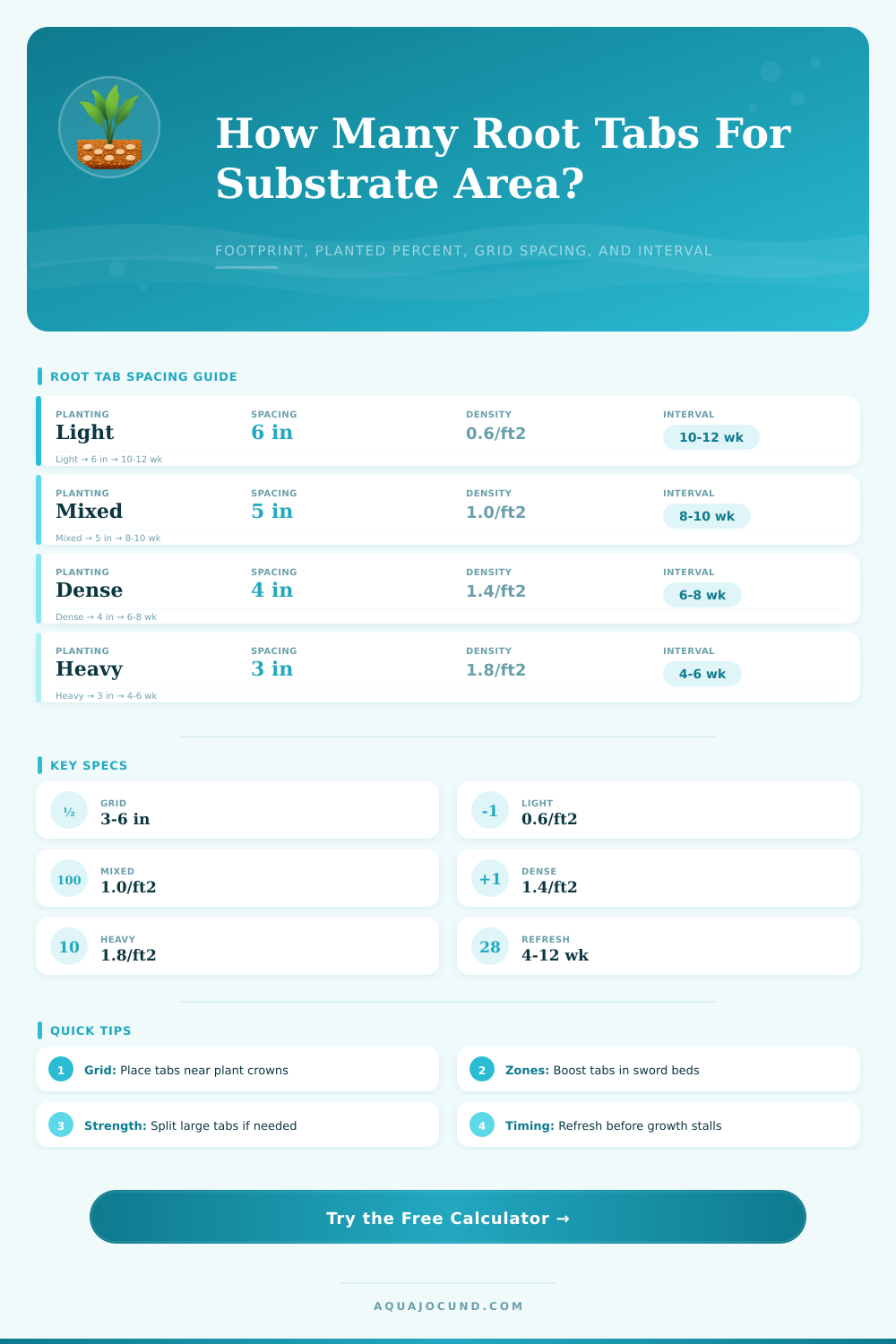
| Spacing grid | 6 in / 15 cm for light beds | 5 in / 13 cm for mixed roots | 3 to 4 in / 8 to 10 cm for heavy zones |
| Tab strength | Large tabs reduce count | Standard tabs match label dose | Mild tabs may need more pieces |
| Replacement interval | 10 to 12 weeks for low demand | 6 to 8 weeks for mixed tanks | 4 to 6 weeks for hungry rosettes |
| Heavy root zones | 0 to 15% for scattered crowns | 20 to 35% for rooted beds | 40% plus for sword or lotus groups |
| Substrate | Root Tab Behavior | Placement Note | Interval Bias |
|---|---|---|---|
| Fine sand cap | Holds tabs in place but can compact | Push tabs below active roots | Use normal interval |
| Rounded gravel | More water flow around tabs | Place deeper to reduce leaching | Refresh slightly sooner |
| Aquarium soil | Already nutrient active early on | Use fewer tabs until soil ages | Extend interval if growth is strong |
| Soil with sand cap | Strong reserve with capped release | Focus only on heavy root crowns | Use a longer interval |
| Deep planted bed | Roots spread through layers | Stagger tabs around large plants | Match plant demand |
| Inert decorative | Tabs carry most root nutrition | Use grid plus heavy zone boost | Refresh on schedule |
Your Amazon swords can be looking all wilty and guess what? They are just out of substrate nutrients. Substrate starvation is a common issue, not necessarily a lighting issue. Your roots lives there so feed them there.
Be sure to estimate how many root tabs you will need to cover the footprint of your tank. Don’t overdose and cause cloudiness. Also don’t starve your plants with insufficient nutrient. That’s where the math comes in, and the calculator up top does it for you. The inputs can help you avoid guessing blindly.
How to Use Root Tabs for Your Plants
Begin with what you have, the space in which you’re going to work: the tank shape and substrate area. What’s your footprint? Do you have a ten-gallon betta bowl (tiny) or a forty-breeder (large)? Next, the tool turns that real estate into something you can use. Enter your planted percentage. Why? Because there may be open areas or some sort of hardscape you don’t want to fertilize so adjust accordingly. Placing tabs underneath exposed sand isnt efficient.
The other thing you do is specify grid space and density; both of which is points you can use. Small crypts is light feeders through their roots; they need only a wide six-inch grid. By contrast, heavy sword beds in a jungle take up nutrients fast so go tight at just three to four inches. Since roots expand outwards, the calculator compares a physical grid to area-density and picks the higher number; this wouldn’t of helped if I place a tab beyond reach of the plant’s crown.
Slow release tabs comes in varying strengths, from mild to concentrated. To fit these diffrences, the tool will normalize the count according to its strength. Similarly you establish the replacement interval as guided by what you see happening in your tank. In a low-tech tank where growth is sparse due to lack of competition, the interval might be 10 or even 12 weeks, while four to six weeks is probably closer then in a high-carbon dioxide tank full of lush growth. A slower growth cycle means less frequent turn-over (see reference table).
Roots love heavy zones: Why? Because it doesn’t matter if they’re heavy all over; you increase concentration in the areas where roots is most hungry. For instance, if you use a quarter to half of your tabs on just those places, it is like creating pockets of nutrients as nature do. It’s an easy tweak that makes a huge difference and the calculator includes that room when you indicate how large each zone is.
Nutrient behavior varies by substrate. Tabs will need to be re-placed more frequently, and at a greater depth (inert gravel leaches rapidly into water column). Aquarium soil retains its reserves longer, initially allowing broader spacing between replacement. Be cautious with fine sand, which may suffocate plant roots if tabs are pressed too deeply. Take the recommended count as guidance; adjust accordingly for your medium. For example, if the calculator says 15 tabs for gravel but you have nutrient-rich aquarium soil, try ten and monitor the results. The numbers are just a starting point.
In the end, it’s up to your plants. Are new leaves pale? Stunted? Before your next change then reduce the interval. Did an algae bloom occur even though water changes was good? Then perhaps you’ve gone past the dose. Aim for steady growth with no harm to the water column. After adjusting the spacing of grids based off nutrient need, you’ll see healthy, vibrant plants.