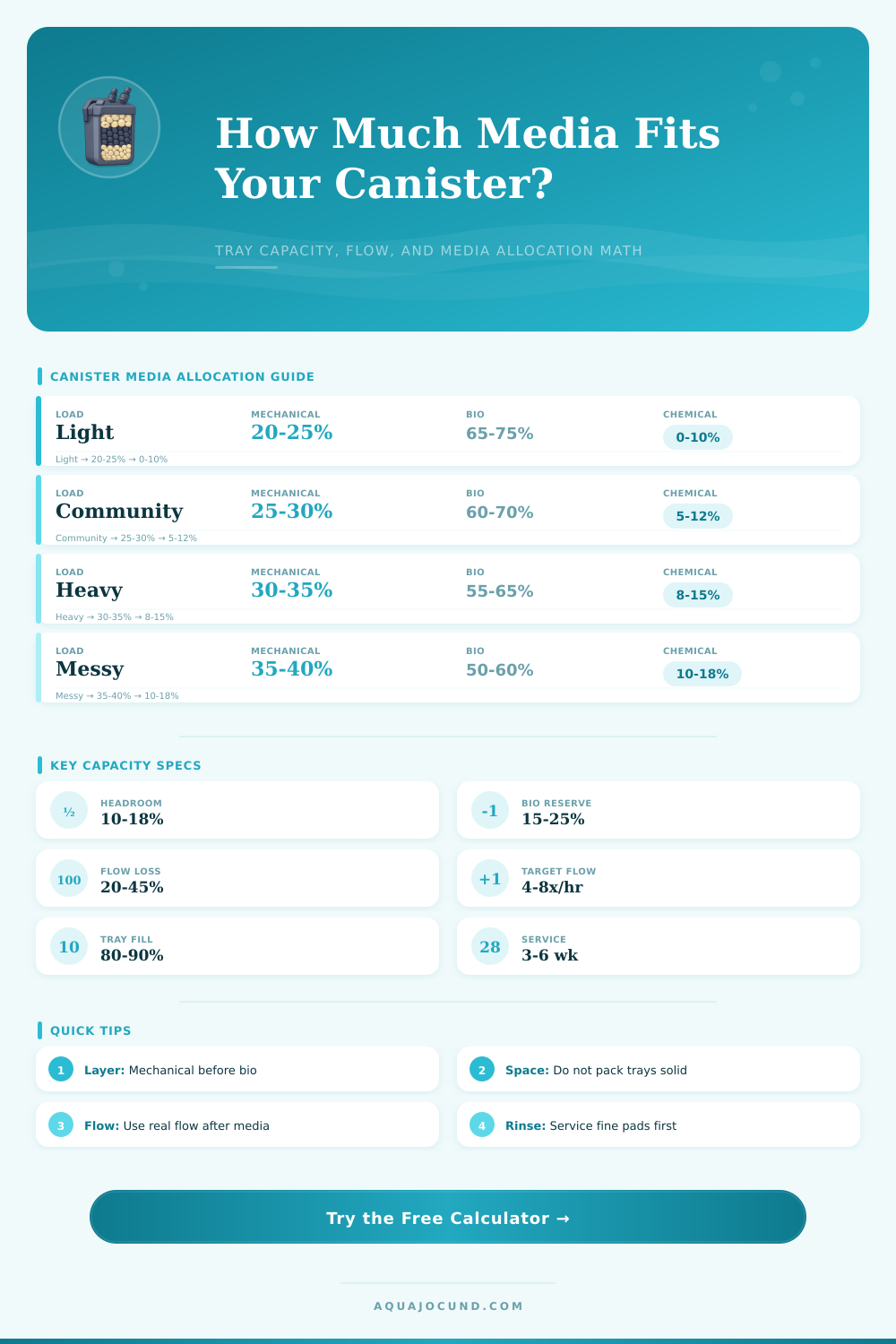
Canister Filter Media Capacity Calculator
Allocate canister tray space for mechanical, biological, and chemical media based on tank load, real flow, and service interval.
Capacity Breakdown
| Media Type | Main Role | Typical Tray Share | Flow Behavior | Calculator Factor |
|---|---|---|---|---|
| Ceramic rings | Bio plus flow channels | 55-70% | Open and forgiving | 1.00 baseline |
| Sintered glass | High efficiency bio | 50-65% | Medium restriction | 0.80 required volume |
| Porous pumice or matrix | Dense bio capacity | 50-65% | Medium restriction | 0.85 required volume |
| Coarse sponge blocks | Mechanical plus bio | 25-45% | Open until clogged | 1.15 required volume |
| Plastic bio balls | High flow bio | 45-70% | Very open | 1.35 required volume |
| Fine pad or floss | Water polishing | 5-15% | Clogs fastest | Mechanical only |
| Activated carbon | Chemical polishing | 5-15% | Medium restriction | 0.0015 L per tank L |
| Resin media | Targeted removal | 4-12% | Use in bag | 0.0010 L per tank L |
| Canister Class | Media Capacity | Rated Flow | Good Tank Range | Typical Allocation |
|---|---|---|---|---|
| Nano canister | 1.0-2.0 qt / 0.9-1.9 L | 80-150 gph / 300-570 lph | 10-25 gal / 38-95 L | More sponge, modest bio |
| Compact canister | 2.0-3.5 qt / 1.9-3.3 L | 150-250 gph / 570-950 lph | 25-45 gal / 95-170 L | 25% mechanical, 65% bio |
| Mid-size canister | 4.0-6.5 qt / 3.8-6.2 L | 250-400 gph / 950-1510 lph | 45-75 gal / 170-285 L | Balanced trays |
| Large canister | 7.0-10.0 qt / 6.6-9.5 L | 400-650 gph / 1510-2460 lph | 75-125 gal / 285-475 L | Extra bio reserve |
| XL canister | 10.0-16.0 qt / 9.5-15.1 L | 650-900 gph / 2460-3410 lph | 125-220 gal / 475-830 L | Separate polishing tray |
| Load Setting | Bio Demand | Mechanical Demand | Best Service Range | Use When |
|---|---|---|---|---|
| Light | 0.55x | 0.75x | 4-6 weeks | Small fish, careful feeding |
| Planted community | 0.70x | 0.85x | 4-6 weeks | Plants help process nutrients |
| Community | 0.80x | 1.00x | 3-5 weeks | Normal mixed aquarium |
| Heavy | 1.15x | 1.25x | 3-4 weeks | Cichlids or high feeding |
| Messy | 1.40x | 1.55x | 2-4 weeks | Goldfish, large fish, predators |
| Fry grow-out | 1.00x | 1.45x | 1-3 weeks | Fine food and frequent feeding |
| Water Path Stage | Media To Place | Suggested Share | Why It Matters |
|---|---|---|---|
| First tray or first layer | Coarse sponge or prefilter foam | 15-25% | Catches large solids before bio media |
| Middle biological trays | Ceramic, sintered glass, pumice, or mixed bio | 50-70% | Keeps the most stable media protected |
| Final polish layer | Fine pad, floss, or polishing sponge | 5-15% | Removes fines after biological media |
| Optional media bag | Carbon, resin, or specialty media | 0-18% | Uses remaining space without replacing all bio |
A canisters filter can perform several functions at once. A canister filter move water through the filter. A canister filter traps solid wastes.
A canister filter provide a home for beneficial bacteria to grow. Additionally, if you put chemical media into the tray of the canister filter, the canister filter can also remove dissolved compounds from the water. The type of media that you place into your canister filter must match the waste that the aquarium is producing.
How to Choose Media for a Canister Filter
The waste that the aquarium produces change based on the number of fish in the tank, the amount of food that you feed the fish, and how often you clean the canister filter. By making sure that the media in your canister filter match the waste load of your aquarium, your water will stay clear in your tank between water changes. In order to determine the requirements for your canister filter, you must consider several different input.
One of the main inputs that you should use to determine your canister filter requirements is the volume of your tank. Another main input that you should use is the rated pump flow of your canister filter. The rated pump flow of your canister filter will often be higher than the actual flow of water that is moving through your canister filter due to the loss of flow caused by the hoses and dirty biological media.
The canister filter media calculator use mathematical equations to account for this and display the actual flow rate of your canister filter to you. Additionally, you should consider the stocking level of your aquarium as an important input into determining your canister filter requirements. One aquarium that contain many fish will require more biological media than an aquarium that contains fewer fish.
Finally, the service intervals for the canister filter are also an important input into determining the media requirements for your aquarium. For example, if you clean your canister filter every three weeks, it does not need to have as much biological media as a canister filter that is cleaned every six weeks. Mechanical media is used for the canister filter to catch any solid waste before it reach the biological media within the filter.
It is important for the mechanical media to catch the solids first in order to prevent the waste from reaching the biological media and smothering the beneficial nitrifying bacteria. You will need more mechanical media if the waste load from your tank is high or if the particles of waste that exit your tank are very finely. For example, you will need more mechanical media in your canister filter for a tank that contains goldfish due to the high amount of waste that the goldfish create, and the quick breakdown of the waste from the goldfish.
The media flow calculator will automatically adjust the amount of mechanical media that is recommended for your canister filter if you change the stocking level of your aquarium. Biological media take up the bulk of the volume of your canister filter once you have provided enough space for the mechanical media. The type of biological media that you choose will determine how much volume the biological media take up within your canister filter.
Media that contains a high amount of surface area, such as sintered glass or pumice will take up less volume than biological media that contains little amount of surface area, such as traditional ceramic filter rings. Additionally, the headroom percentage for the biological media is another important input for your canister filter. The headroom percentage represents the amount of empty space within the trays of the canister filter for the biological media.
This percentage is used to ensure that the biological media does not compact together, preventing the water from tank from bypassing the biological media. The headroom percentage ensure that the amount of water that passes through the biological media will be consistent even when the biological media becomes clogged with waste. Chemical media is used to fill the remainder of the volume in the canister filter after accounting for the volume that is taken up by both the mechanical and biological media.
Chemical media include media such as carbon and resins that perform various chemical processes in your tank. The downside to chemical media is that it restrict the amount of water that passes through the media compared to biological media. The media flow calculator for your canister filter will limit the amount of chemical media you can select so that you do not reduce the volume of biological media necessary in your tank to handle the waste from your aquarium.
If the calculator recommends that you do not have enough biological media in your tank, you must adjust the amount of chemical media in your canister filter. Reducing the amount of chemical media is the easiest way to increase the amount of volume that your biological media can have. One of the main outputs that you can use from the canister filter media volume calculator is the effective turnover rate of the canister filter.
The effective turnover rate will tell you how often you must service your canister filter. If the effective turnover rate is too low, say if it drops below four times the recommended turnover of your tank volume per hour, the waste will remain in the water too long and the mechanical media will become clogged too quickly. The last main output of the canister filter media volume calculator is the capacity status indicator for your canister filter.
This indicator will let you know if you have adequate biological media to handle the waste in your tank until you service the canister filter. A short capacity status will tell you that you do not have enough biological media in your tank, or that you must clean your filter more often then you currently plan on doing. These numbers will allow you to make changes to your canister filter to ensure that your aquarium remains stable.
For example, if you use the calculator to determine the amount of biological media in your filter, and the calculation reveal that you do not have enough biological media in your tank, you can make targeted changes to the media rather than changing all of the biological media in your tank. By making targeted changes to your canister filter media, you can better ensure that your biological filter within your tank remains stable.